









Connect MONJI+ to your AI client with AI integration (MCP), and AI clients such as Claude and ChatGPT can read feedback comments along with where they point.
Use them to summarize comments, get UI improvement ideas, or fix code based on the comments.
For the connection steps, see How to connect an AI client (MCP).
Requirements
You can read feedback when all three of the following are met.
⚫︎ Plan
Available on every plan, including the Free plan.
On the Free plan, feedback older than 30 days can’t be viewed in MONJI+, so it can’t be read through an AI client either.
See Can I use AI integration (MCP) on the Free plan? for details.
⚫︎ Role permission
Your role must be allowed “MCP integration: Feedback”.
By default, only “Admin” can use it.
See Set the permission to use team data over MCP by role for how to set it.
⚫︎ Viewing the feedback
You must be able to view the feedback in MONJI+.
Feedback with viewing restrictions can only be read by the users allowed to view it.
Copy a prompt to get started
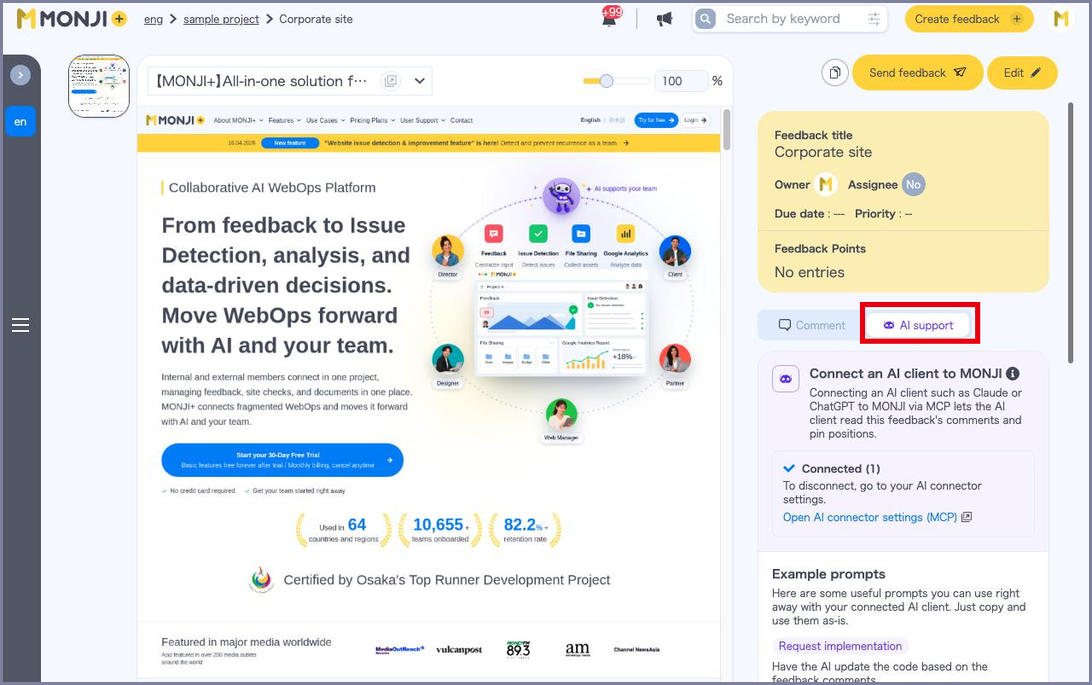
Open a feedback view, then switch to “AI support” in the panel on the right to copy a prompt for what you want to do.
Use them to summarize comments, get UI improvement ideas, fix code based on the comments, and more.
Paste the prompt into your connected AI client.
Feel free to edit the prompts to fit your purpose.
What can be read, and the tools
For what your AI client can read and the tools it uses, see Data and tools available through the official MONJI+ MCP server.
※A feedback “public link (password protected)” URL can’t be used with AI integration (MCP).
If feedback can’t be read
⚫︎ Your role isn’t allowed “MCP integration: Feedback”
Ask a team administrator to turn the permission on.
See How can members and guests use team data over MCP? for details.
⚫︎ The feedback has viewing restrictions
When specific users are set as viewers, a user who isn’t one of them can’t read it through an AI client either.
Feedback only its creator can view can only be read by that user.
⚫︎ The Free-plan viewing period has passed
On the Free plan, feedback can be viewed and edited for 30 days after it’s created.
If you move to a paid plan within 120 days of creating it, that feedback becomes viewable again.
For other causes, see I connected AI, but it cannot read information from MONJI+.